

Reading the PDF report
What's on the cover, room, and signature pages of an approved condition report, and how to share it or send it straight to your lead tenant.
The moment you tap Approve Report, Propero generates the PDF. Access it from the report summary on Property Health.
PDF contents
Cover page: report type and property address, the relevant date (move-in or move-out, not shown for a routine inspection), inspection date, landlord and tenant names, a count of rooms inspected and items noted, and the full room list. If any room has a smoke detector, a compliance table lists each one as tested and battery-replaced or not. Meter readings and keys and security notes appear here too, if you filled them in (not collected on routine inspections).
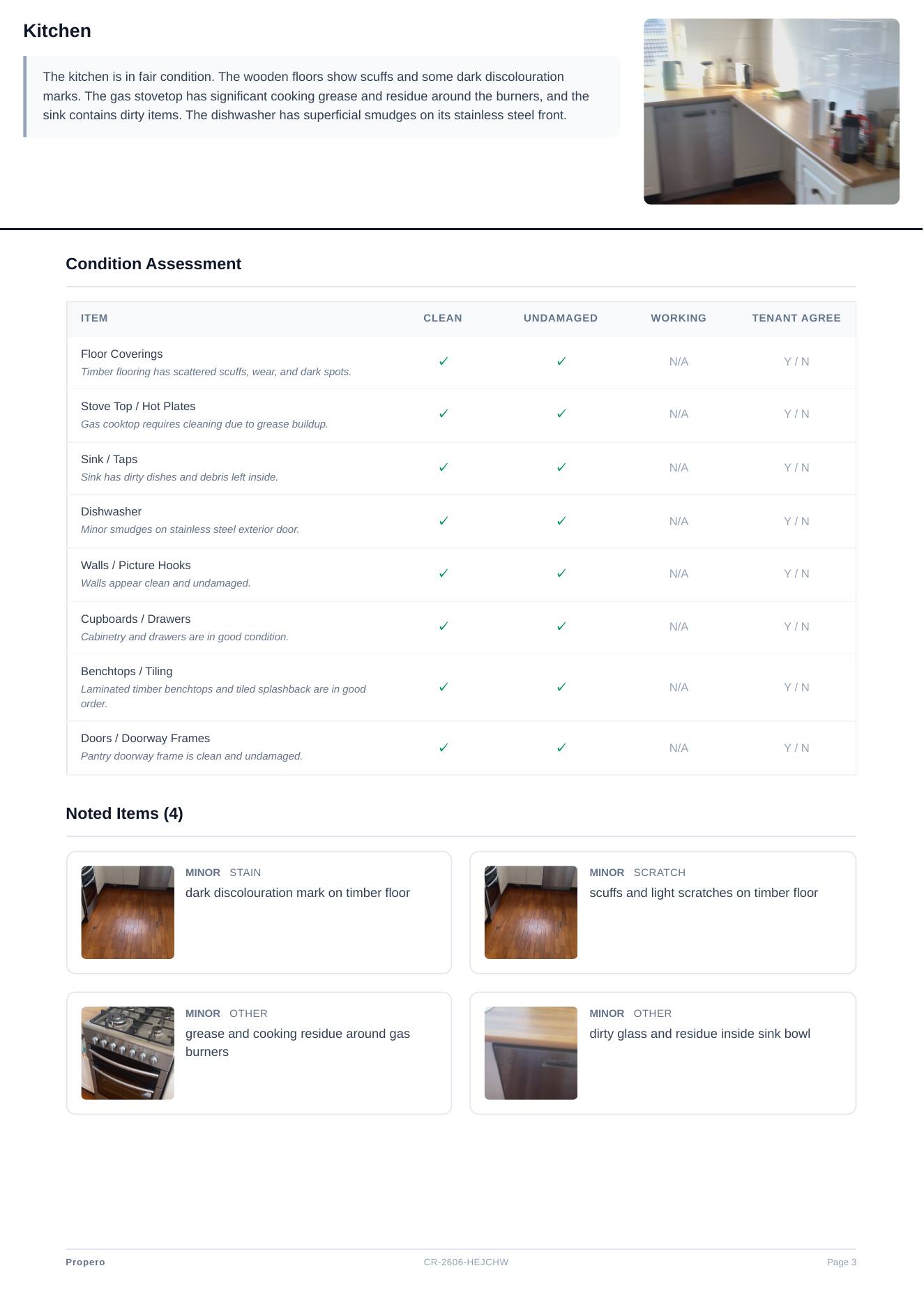
A page per room: the room name, an overall cleanliness rating, and the AI's written summary of what it found. Below that, a table of every element (walls, flooring, fixtures, and so on) marked clean, undamaged, and working, or N/A where it doesn't apply. Any noted issues follow, each with a still pulled from your video where available, a severity badge (minor, moderate, major), a category, a description, and your own notes if you added any. Issues you added manually are tagged Added by landlord. Your own photos, with captions, appear at the end of the room.
Signature page: a disclaimer that the report was generated with AI-assisted analysis, that Propero makes no warranties about its accuracy or completeness, that AI-generated observations may contain errors or omissions, and that this isn't a substitute for a professional property inspection. Below that are printable name, signature, and date lines for both landlord and tenant. This is a page you print or sign by hand. Propero doesn't capture a digital signature in the app.
Share or send
| Action | Result |
|---|---|
| Share | Opens the native share sheet (Files, AirDrop, and so on) |
| Send to Tenant | Opens Mail (or Messages, as a fallback) with the PDF attached, addressed to the lead tenant |
Send to Tenant only appears once a PDF exists and the lease's lead tenant has an email address on file. It opens the Email tenant sheet with the report attached and wording already written, to send from the property address. See Communicating with tenants.
PDF not ready yet
If you see PDF not available yet, the file is still generating after approval. Wait a moment and try again.
Failed rooms
A room that fails analysis shows Analysis failed with a note that Propero couldn't analyse that room's video, so it's excluded from the report's condition and score. Use Retry Analysis to re-run the whole report (see Amending a report).
Related guides
Outgoing condition report
Document condition at move-out against this tenancy's ingoing baseline, with meter readings and key notes, ready for bond discussions.
Amending a report
While a report is in Pending review, change element conditions, dismiss AI issues, add photos and notes, or retry analysis that didn't finish.