

Setting up rent
Rent is always entered as a weekly figure during tenant setup, with bond defaulting to four weeks. Terms are read-only once the lease is running.
Rent is configured during tenant setup, not on a separate screen afterward.
During tenant setup
On the Lease terms step, choose:
- Lease type: Fixed (has a set end date) or Periodic (rolls on with no end date)
- Start date
- For fixed leases, a term: 6 months, 12 months, or Other (which opens a custom end date). The end date is set from your term choice and shown in full with the year, for example "26 Jun 2026 to 26 Jun 2027" on the review step. Change the start date and the end date moves with it for the term you picked. If the dates look like a mistake (for example the end falls before the start), a quiet check line appears under them.
- Rent frequency: Weekly, Fortnightly, or Monthly
Lease dates can't be edited after setup. To change them later, end the tenancy and start a new lease from Lease Overview.
On the Financials step, enter:
| Field | Notes |
|---|---|
| Weekly Rent | Always entered as a weekly figure, even for fortnightly or monthly leases. Once you've picked a frequency other than weekly, a caption under the field shows the converted amount, for example "$2,932.98 per month". |
| Bond amount | Defaults to four weeks' rent and recalculates as you type the weekly rent. Edit it yourself and Propero stops auto-updating it. |
| Advance rent paid | Any rent already received before the schedule starts. Shown when the lease starts today or later, unless you chose My tenant moves in soon, where there's nothing to record in advance. |
| Paid up to and including | Replaces advance rent when the lease started before today. The last day your tenant has actually paid for. Rent is tracked from the day after. |
Propero builds your payment schedule the moment the tenancy is created. Advance rent you enter is applied straight to the first period or periods of that schedule.
Adding a tenancy that's already running
If you enter a start date in the past, the Financials step swaps Advance rent paid for Paid up to and including, defaulting to today. Set it to the last day your tenant has paid for and rent tracking starts the day after. Propero deliberately won't create months of historical periods marked overdue, so you don't open the app to a wall of false arrears and a run of reminders about rent you already collected.
That day after your paid-to date becomes the rent day. If it doesn't land on the cycle the lease start implies, Propero confirms the move on Next ("Rent day will move to Thursday") before it builds the schedule. See Backdated tenancies.
After setup
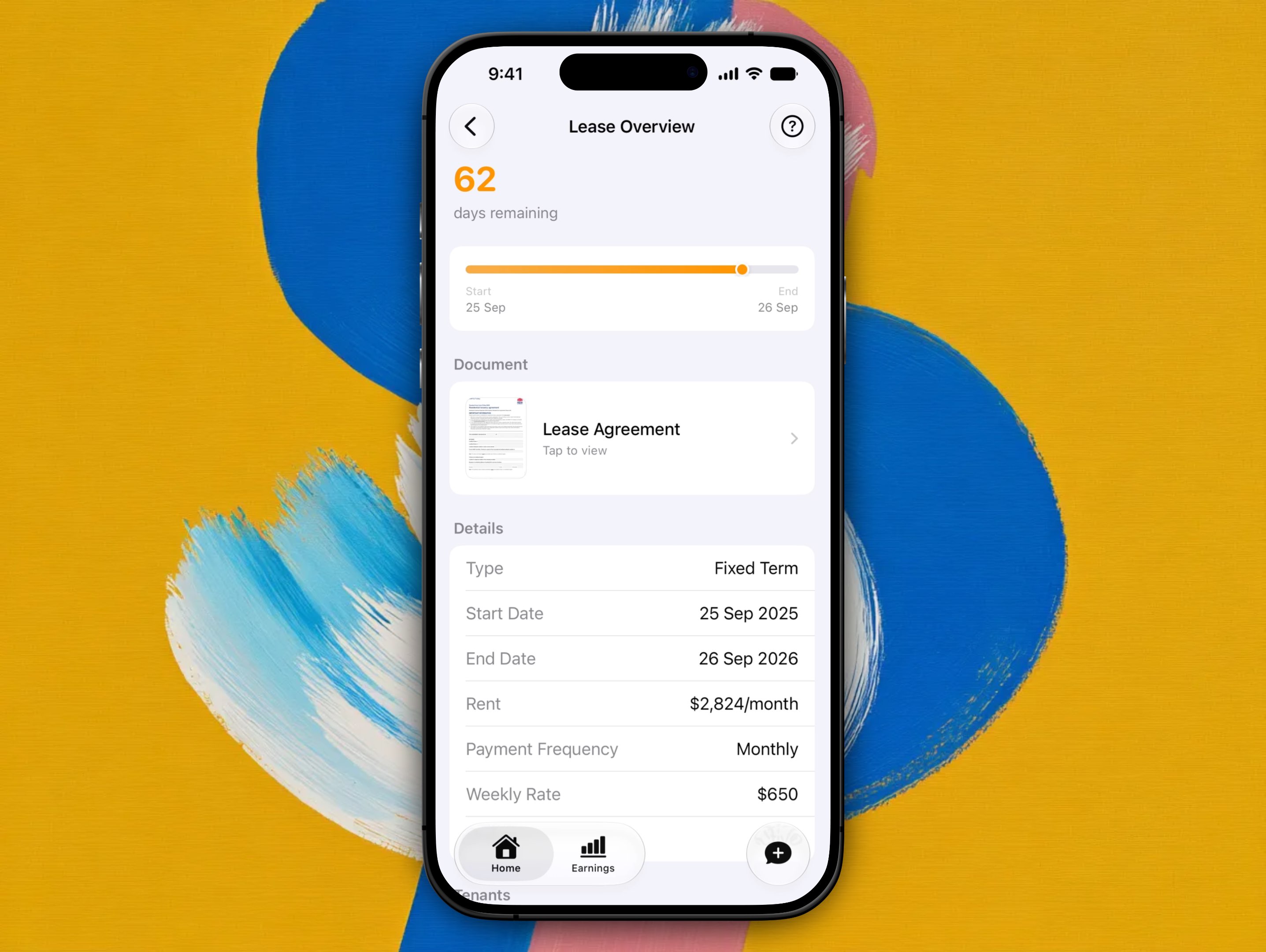
Lease details appear as read-only on Lease Overview (hub > Lease): term, rent, frequency, weekly rate, and status. You can't edit terms from this screen, on purpose: once end-of-tenancy declarations and termination notices are recorded against the lease, changing its terms afterward would undermine that paper trail.
Changing rent or frequency mid-lease
You cannot change rent frequency or other lease terms while a lease is running. To change terms:
- End the current tenancy from Lease Overview (see Renewals & ending a tenancy)
- Start a new lease with Start New Lease
There is no in-app editor for mid-lease term changes.
Payment schedule basics
Each period on the Payment Overview heatmap represents one scheduled payment. Status values:
| Status | Meaning |
|---|---|
| Upcoming | Not yet due |
| Due | Due today |
| Late | Within the one-day grace period after the due date |
| Overdue | Past the grace period |
| Paid | Fully paid |
| Cancelled | Period cancelled (for example after an early lease end) |
A period that's been part paid keeps whichever status it had. It stays Due, Late, or Overdue until the balance is cleared, and shows the remaining amount when you open it.
Status updates once each day at 9am Sydney time. It may not change the instant you record a payment.
See Recording payments for how to mark rent as received.
Propero stores the bond amount for your records. You must still lodge the bond with your state authority separately. See Starting a tenancy resources for lodgement portals and forms, and Returning the bond when the tenancy ends.
Related guides
Rent & payments
Rent is set during tenant setup and tracked on Payment Overview. Covers the schedule, recording payments, arrears, receipts, and ledgers.
Backdated tenancies
When you add a tenancy that already started, you tell Propero what date the tenant is paid up to. Rent tracking starts the day after, and that day becomes the rent day.