

Contacts
Save the people Propero can email for you, such as your accountant, a tradie or a property manager. Ask Chat to email one and it goes from the property's address once you confirm, with replies coming back to your own inbox.
Propero Mail can write to more people than your tenant. Save your accountant, a tradie, a property manager or a co-owner as a contact, and you can ask Chat to email them from the property's address: "send this to my accountant", "let Dave know the tenant is home Thursday".
Your contacts live in Account (your initials on Home) > Propero Mail, under People Propero can email. Each row shows the person's name, with their role and email address underneath.
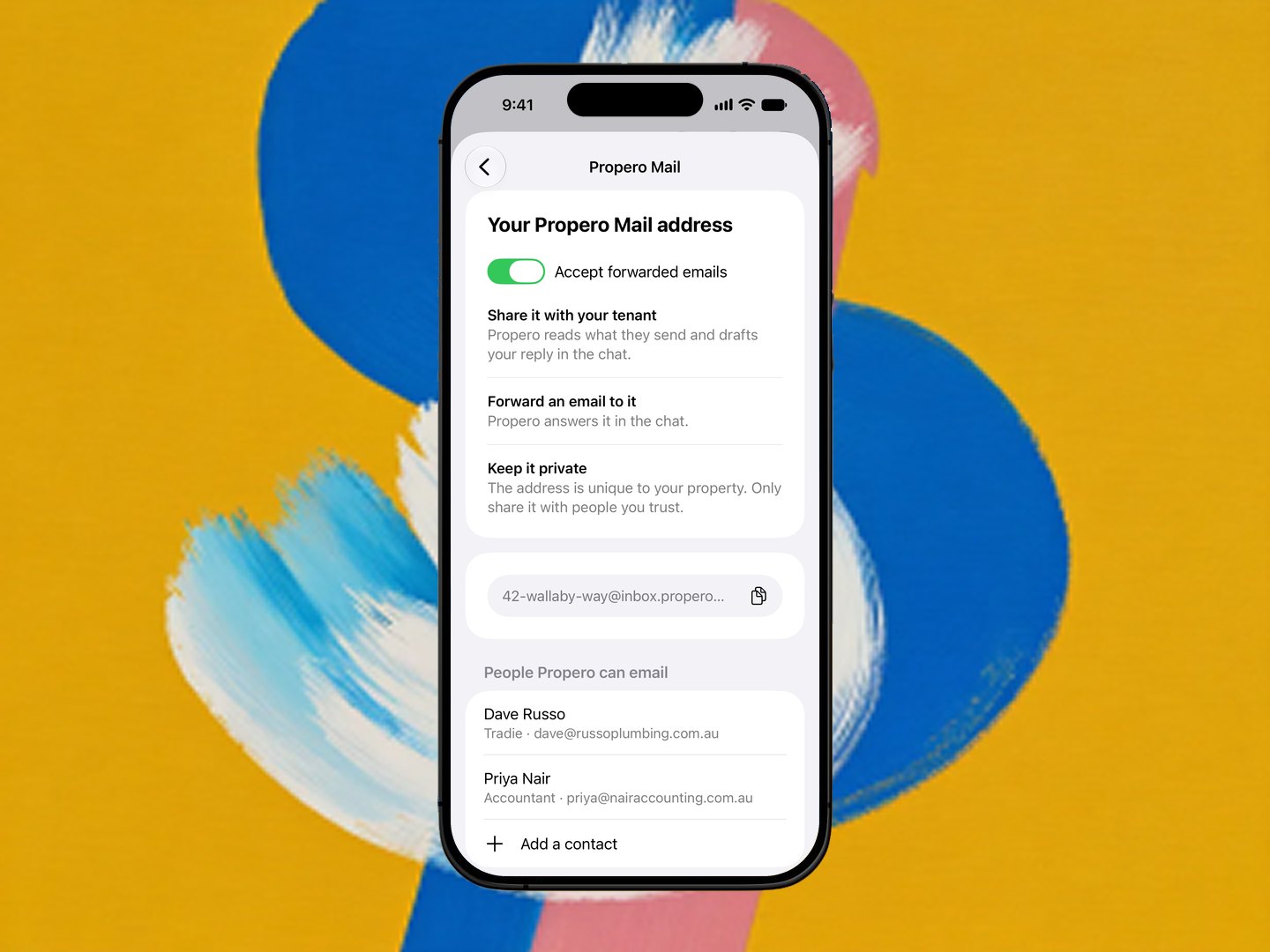
Adding a contact
Contacts are saved through Chat, not a form. Tap Add a contact and Propero opens the Chat tab with a message ready in the composer: "I'd like to save a contact Propero can email from my property address." Send it, or just tell Propero who it is in your own words at any time: "save jane@example.com as my accountant".
Propero asks for anything it's missing, then shows the usual confirm sheet, reading Propero wants to save a contact. Show details lists the Name, Email, Role and any note you gave. Nothing is saved until you tap Confirm. See When Propero proposes a change.
A contact's role is one of Accountant, Tradie, Property manager or Co-owner, or plain Contact for anyone else.
A few things to know:
- One address is one contact. Saving the same email address again updates the name, role or note instead of adding a second row.
- Tenants aren't contacts. Propero won't save a current or past tenant's address. You write to tenants the usual way, see Communicating with tenants.
- Your own address isn't one either. Propero already emails you at the address you signed up with.
Emailing a contact
Ask in the chat: "email my accountant and ask when my return will be ready". To send a file, attach the PDF to the same message with + (a tax summary or an invoice, say) and ask Propero to send it. Propero writes the email and shows a sheet reading Propero wants to send an email, with everything that will go:
| Line | What it shows |
|---|---|
| To | The contact's name and email address |
| From | The property the email leaves from |
| Subject | The subject line |
| Attachments | Any files going with it |
| Message | The email itself |
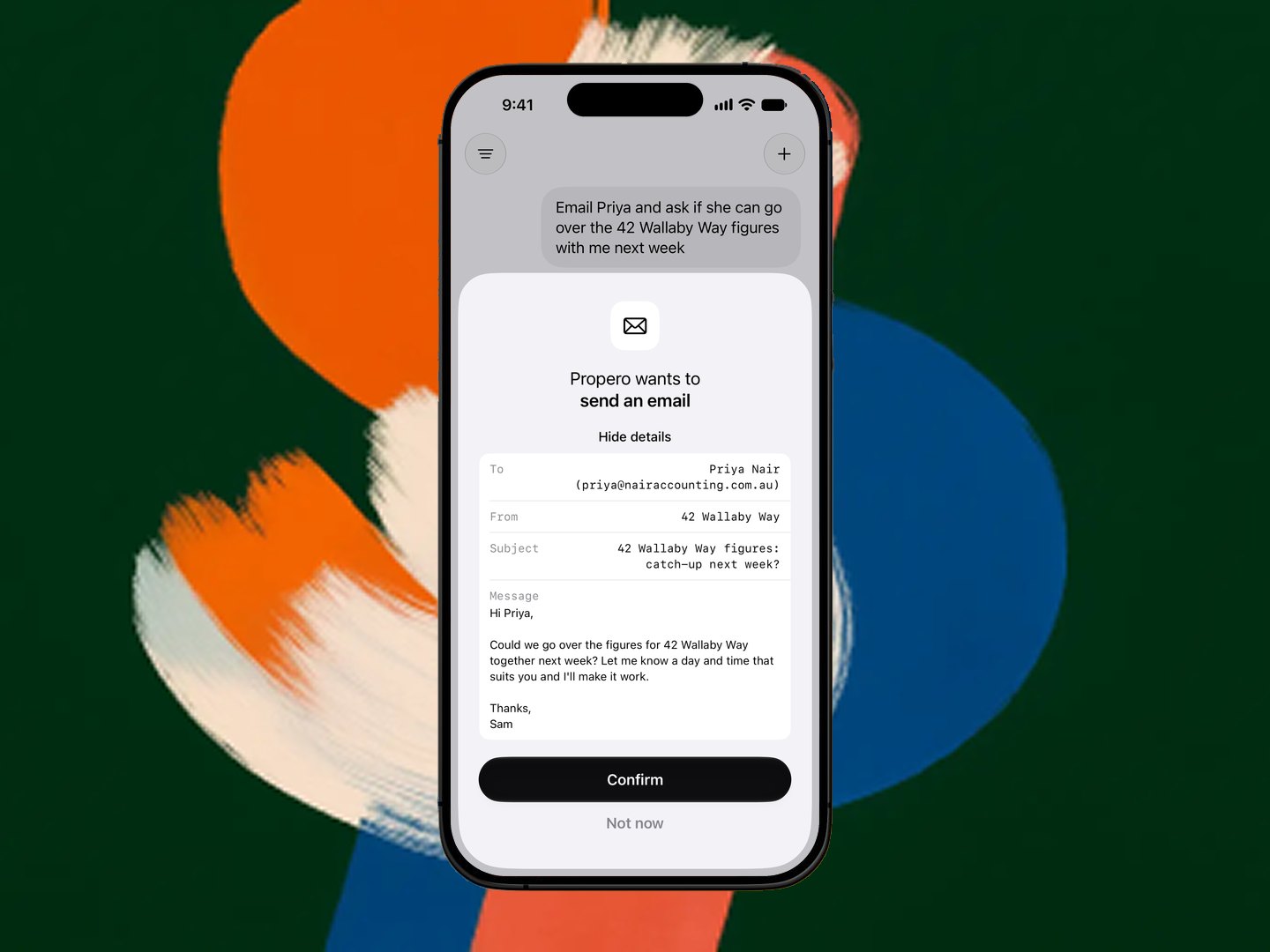
Nothing goes until you tap Confirm. Not now closes the sheet without sending. Once you confirm, the transcript shows Email on its way.
Propero only emails people you've saved, and only when you ask in the chat yourself. It never emails a contact because of something in a tenant's email or one you've forwarded.
Where it comes from, and where replies go
The email leaves from the property's Propero Mail address, with your name on it ("Sarah via Propero"). The property needs an address set up first, see Setting up your address. With more than one property, it goes from the one the chat is about.
Reply-To is set to your own email, the address you signed up with. When your accountant hits reply, the answer lands in your usual inbox, not in Propero.
Emails to contacts count toward the same sending limit as replies to tenants: 200 a day and 10 a minute, across all your properties.
Removing a contact
In Account > Propero Mail, swipe left on the contact and tap Remove. Propero asks "Remove Jane Smith?" first: "Propero won't email them any more. You can ask Propero to save them again." Tap Remove to confirm.
On a Free account
Contacts are part of Propero Pro, like the rest of Propero Mail. On a Free account, or once a Pro subscription has ended, Propero won't save or email a contact and will tell you it needs Pro when you ask. See Subscription & billing.
Saved tradespeople are separate
The tradies you keep under Maintenance > Options > Saved Tradespersons are a different list, used for assigning repair jobs. Saving a tradie there doesn't let Propero email them, and saving one as a contact doesn't add them to Maintenance. If you want Propero to email a tradie, save them as a contact too. See Tradies & assigning work.
Related guides
Forwarding your own emails
Forward an email from your sign-in address to a property's address and Propero answers it, in Chat and by email back to you. Forward an invoice and it files the expense straight away, reading the attached PDF. Covers the Accept forwarded emails switch and Hide My Email accounts.
Rent & payments
Rent is set during tenant setup and tracked on Payment Overview. Covers the schedule, recording payments, arrears, receipts, and ledgers.